
What Are AI Chrome Extensions and Why Do You Need Them?
AI Chrome extensions are smart tools that work directly inside your browser. You do not need complex software or technical skills to use them.
They help you:
- Research faster
- Automate boring tasks
- Write better content
- Manage your work without stress
In 2026, these tools are not just assistants. They act like mini employees that handle work for you.
Imagine having a helper that:
- Reads long articles and summarizes them
- Collects data automatically
- Writes emails in your tone
- Tracks important updates online
If you are serious about saving time and growing your business, using the Best AI Chrome Extensions is no longer optional.
1. Research and Strategy Tools
If you spend hours searching on Google but still feel confused, you are not alone. Research can feel overwhelming, especially when you have too much information and not enough clarity.
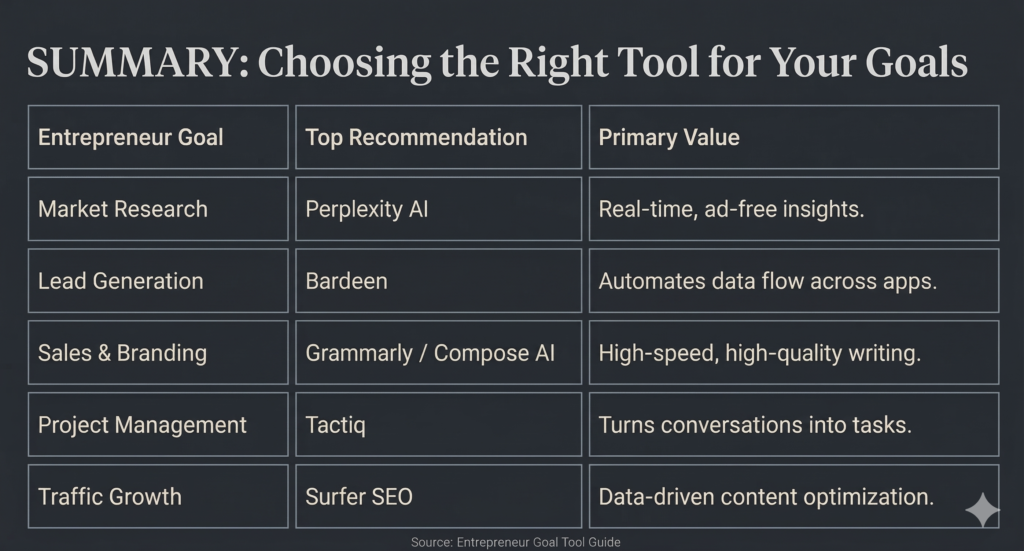
Perplexity AI solves this problem.
It reads the page you are on and gives you clear, simple answers with real sources.
Best for:
- Market research
- Competitor analysis
- Quick fact checking
Why it matters:
Instead of going through long reports, you get the key points in seconds. This saves time and helps you make faster decisions.
Example:
You can turn a long competitor page into a short list of strengths and weaknesses.
👉 If research slows you down, this is one of the Best AI Chrome Extensions to try first.
2. Workflow Automation Tools
Manual work like copying data or sending emails can drain your energy.
Copying data, switching between tabs, sending emails. These small tasks may seem simple, but they take hours over time.
Bardeen helps you automate these tasks with simple commands.
Best for:
- Lead generation
- Data transfer
- Repetitive workflows
What it can do:
- Collect leads from websites
- Send them to your tools
- Create outreach emails automatically
Harpa works like a smart assistant that watches websites for you.
It monitors websites, tracks changes, and even extracts data for you.
Best for:
- Tracking price changes
- Monitoring competitors
- Extracting data
Why entrepreneurs love it:
You do not need any technical skills. Everything works in the background while you focus on other tasks.
👉 This is one of the Best AI Chrome Extensions if you want to stay ahead of your competitors.
3. Communication and Content Tools
It’s no longer just a spell-checker. The 2026 version includes Strategic Tone Adjustment, which can rewrite your “rushed” emails to sound more empathetic or more authoritative depending on the recipient.
Best for:
- Emails
- Blog writing
- Business communication
Key benefit:
It can make your message sound more friendly or more confident.
This extension “learns” your writing style over time. It sits inside Gmail, LinkedIn, and Slack, offering “Auto-complete” for entire paragraphs based on how you’ve historically replied to similar queries.
Best for:
- Gmail
- Social media replies
What makes it powerful:
It learns your writing style and completes sentences for you.
👉 If you want faster communication, this is one of the Best AI Chrome Extensions to use daily.
4. Meetings and Operations Tools
Tactiq or Fireflies
These extensions join your Google Meet or Zoom calls directly in the browser. They provide real-time transcription, but the 2026 killer feature is Action-Item Triggering.
These tools record and summarize your meetings automatically.
Best for:
- Online meetings
- Team collaboration
- Task tracking
Smart feature:
They can detect action items and create tasks instantly.
Gemini in Chrome
Google has baked Gemini directly into the Chrome architecture. Features like Tab Compare allow you to select three different SaaS pricing tabs and ask the browser to “Create a comparison table of these three tools based on my business needs.”
Best for:
- Comparing tools
- Summarizing multiple tabs
- Quick decision making
Example:
You can compare pricing pages of different tools in seconds.
Benefits of Using the Best AI Chrome Extensions
Here is what you actually gain:
Save Time Every Day
- Reduce hours of manual work
- Focus on important decisions
Increase Productivity
- Automate repetitive tasks
- Work faster without stress
Improve Content Quality
- Write better emails and posts
- Maintain a strong brand voice
Make Smarter Decisions
- Get clear insights quickly
- Analyze competitors easily
grammarly Is best